Resources/Guides

    Interpreter Scheduling Software: The Complete Buyer's Guide for Language Service Providers

    What an interpreter scheduling system actually does, the five things that matter when you choose one, enterprise SLA benchmarks, how the major platforms compare — and a live plan-cost calculator bound to Eclipse's current published rates.

    June 23, 2026 14 min read

    Most language service providers don't outgrow their spreadsheets all at once. It happens one missed booking at a time. A scheduler copies an assignment into the wrong row. Two interpreters get offered the same court date. An invoice goes out without the mileage line. A client emails to ask why no one showed, and three people scramble through email threads to reconstruct what happened. None of it is catastrophic on its own. Together, it's the reason your team works late and your margins leak.

    Interpreter scheduling software exists to close those gaps. This guide explains what the category actually does, the differences between a basic scheduling tool and a purpose-built platform, the five things that genuinely matter when you evaluate one, the service-level benchmarks you should demand before you sign, and how the major platforms compare. There's a calculator to estimate your own plan cost.

    What interpreter scheduling software actually is

    Interpreter scheduling software is a platform built to coordinate interpreting and language-access work end to end: taking in service requests, matching the right interpreter to each one, tracking availability and credentials, capturing job details, and carrying the assignment through to billing and interpreter pay tracking. A general-purpose calendar app can show you who's busy. An interpreter scheduling system has to do something harder — match a request to a provider who has the right language pair, the right certification for a courtroom or a hospital, the right modality, the right location, and, increasingly, the specific interpreter a returning consumer has asked for before.

    That matching problem is what separates a real interpreter scheduling platform from a repurposed booking tool. The work spans modalities most calendars never consider: on-site assignments, video remote interpreting (VRI), over-the-phone interpreting (OPI), document translation, live captioning (CART), sign language, and accessibility services for blind and low-vision consumers. Good interpreting agency software treats all of these as first-class, in one system, instead of forcing your team to stitch together a scheduling app, a billing app, a payments spreadsheet, and a credentials folder.

    The payoff of getting this right is operational, not cosmetic. One source of truth means schedulers, interpreters, and clients all see the same current information. Double-bookings drop. Fill rates rise because open assignments are broadcast to qualified interpreters instead of worked one phone call at a time. Billing stops leaking because the rate rules live in the system, not in someone's head. And the whole thing scales — you can take on more volume without adding a coordinator for every increment of growth.

    The real cost of coordinating by hand

    Before comparing platforms, it helps to size what the status quo costs. Manual coordination has four expensive failure modes. The first is scheduler time: hours each week spent on phone tag, confirmations, and re-confirmations that software can broadcast and capture automatically. The second is fall-through — assignments that go uncovered or interpreters who no-show because reminders depended on a human remembering to send them. The third is billing leakage: travel, overtime, cancellation fees, and modality differences that never make it onto the invoice. The fourth is the growth ceiling — the point where adding clients means adding headcount just to keep the calendar from collapsing.

    You don't need exact figures to feel the shape of it. If coordination eats twenty hours a week across your schedulers and a handful of assignments fall through each month, the annual number is large enough to fund the software several times over. The calculator below estimates the other side of that ledger: what an Eclipse plan would actually cost for your volume.
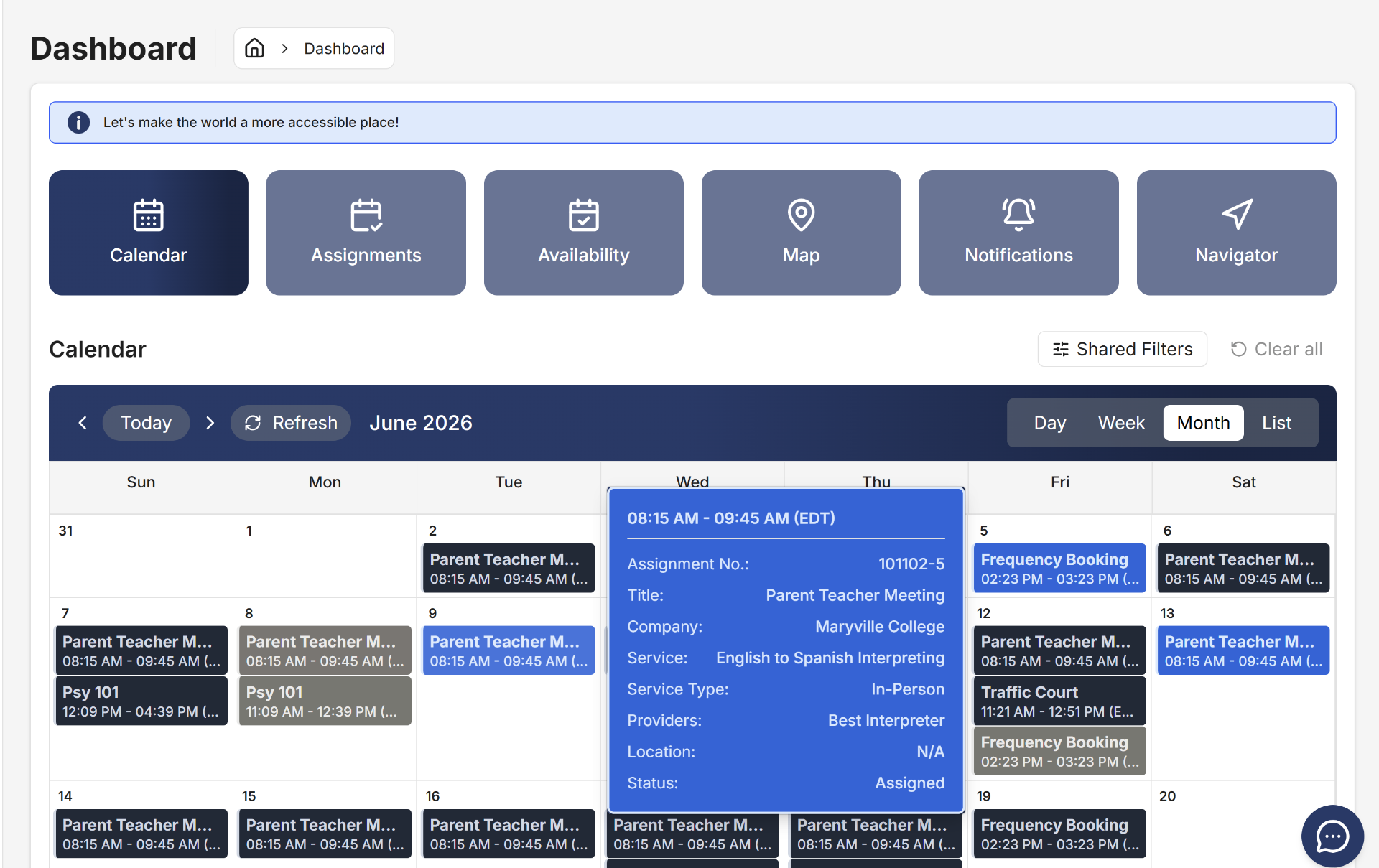
    Eclipse Scheduling dashboard showing the calendar view of interpreting assignments with booking details
    Eclipse dashboard: calendar view of assignments with booking details on hover.

    Estimate your plan cost

    Use the calculator to see which Eclipse tier fits your monthly booking volume and the services you provide, and what pay-as-you-grow usage would add. It reads Eclipse's current published rates, so the estimate reflects real pricing — not a placeholder.

    Eclipse Scheduling
    Pricing Calculator

    Find Your Perfect Plan

    Answer a few questions and we'll recommend the best subscription plan for your organization.

    Estimate based on Eclipse's current published rates and your inputs. Final pricing confirmed at onboarding. See all plans →

    The five things that actually matter when you choose a platform

    Feature checklists run long, but five criteria decide whether a platform helps your agency or becomes another thing your team works around.

    1. Will your team actually use it?

    The most common reason scheduling software fails isn't a missing feature — it's that the interface is confusing enough that schedulers quietly go back to spreadsheets. Your coordinators, interpreters, and clients all have different comfort with technology. Insist on a real trial with your actual team and your actual workflow, and pay attention to how long it takes a new scheduler to become productive. A platform built by people who have done the job is usually the one your team adopts without a fight. Eclipse was designed by interpreters and agency operators, and most clients are trained and live within one to two weeks.

    2. Does it bend to your workflow?

    No two LSPs run billing, rate cards, payment schedules, service catalogs, or client portals the same way. A platform that forces your processes into its assumptions will cost you in workarounds forever. Ask to see how forms, billing rules, payment terms, and the client-facing portal can be configured to match how you already work — and ask whether that configuration is something you control or something you pay professional services to change every time.

    3. Is the security and compliance posture real?

    For healthcare, legal, and government work, this is non-negotiable. Look for HIPAA compliance and a SOC 2 Type II report. One precision point worth knowing: SOC 2 is an attestation produced by an auditor's examination, not a "certification" — vendors who call it a certification are being loose with the language, which tells you something. Confirm data residency, encryption in transit, audit trails, and what the vendor's written SLA actually promises (more on that below).

    4. Does it cover the work you actually do?

    If you deliver on-site, VRI, OPI, translation, captioning, sign language, and accessibility services, you want one platform that handles all of them with interpreter profiles deep enough to match on certification, specialty, location, and consumer preference — not a tool that does scheduling well and makes everything else a manual afterthought.

    5. What's included, and what's extra?

    Two platforms with similar sticker prices can differ enormously once you add the integrations and modules you actually need. Ask specifically whether accounting integration (such as QuickBooks), billing modules, and onboarding carry separate fees — they frequently do. Eclipse includes QuickBooks integration and billing modules at no additional cost and charges no onboarding fee.

    How the major platforms compare

    The interpreter scheduling market splits into two business models, and the distinction matters more than any feature list. Some platforms are also interpreter networks — they operate their own pool of interpreters and sell interpreting services directly. Others are pure management platforms that help you run your own interpreter network and never sell against you. Eclipse is the second kind, by design.

    What to weighEclipseBoostlingoUskedAqua Schedules
    Business modelManagement platform only — your interpreters, your clientsOperates a 17,000+ interpreter network and sells interpreting services directlyManagement platformManagement platform
    Designed byInterpreters & LSP operatorsGeneral IMS vendor——
    Typical time to launch1–2 weeksLonger; users report a steeper admin learning curveConfirm in quoteConfirm in quote
    ConfigurabilityForms, billing, payment schedules, service catalog, and client portalMarkets configurable contracts; some users report workflows don't match agency processesAsk what's configurable vs. fixedAsk what's configurable vs. fixed
    Accounting / billing add-onsQuickBooks integration & billing modules includedConfirm whether integrations are add-onsAsk whether integrations and modules are priced separatelyConfirm
    Onboarding feeNoneConfirm in quoteAsk about onboarding feesConfirm
    Release cadenceNew features monthlyConfirmAsk about update frequencyAsk about active development
    Support termFor the life of the subscriptionConfirmAsk about post-launch supportAsk about technical support hours

    A closer look at the one most agencies shortlist: Boostlingo is the largest player and acquired Interpreter Intelligence and VoiceBoxer, so much of the "two products" you'll hear about are now under one roof. It's a capable, widely used system. Two things are worth understanding before you commit. First, it runs a network model — Boostlingo operates its own interpreter pool and sells interpreting services, which means the platform vendor can also be a participant in the same market your agency competes in. If that matters to you, ask directly how the network interacts with your own client relationships. Second, the depth that comes with a large platform also comes with a learning curve; user reviews commonly cite a confusing admin area and workflows that don't always match how an agency actually operates.

    Eclipse takes the opposite posture on the model question. We see LSPs as partners, not competitors, so we don't sell interpreting services against you. When you do want network coverage, Eclipse can route VRI and OPI requests to a partner network — but only at your discretion, and only after prioritizing your own interpreters first, so your revenue channel comes first and outsourcing happens just to fill gaps you can't cover internally.

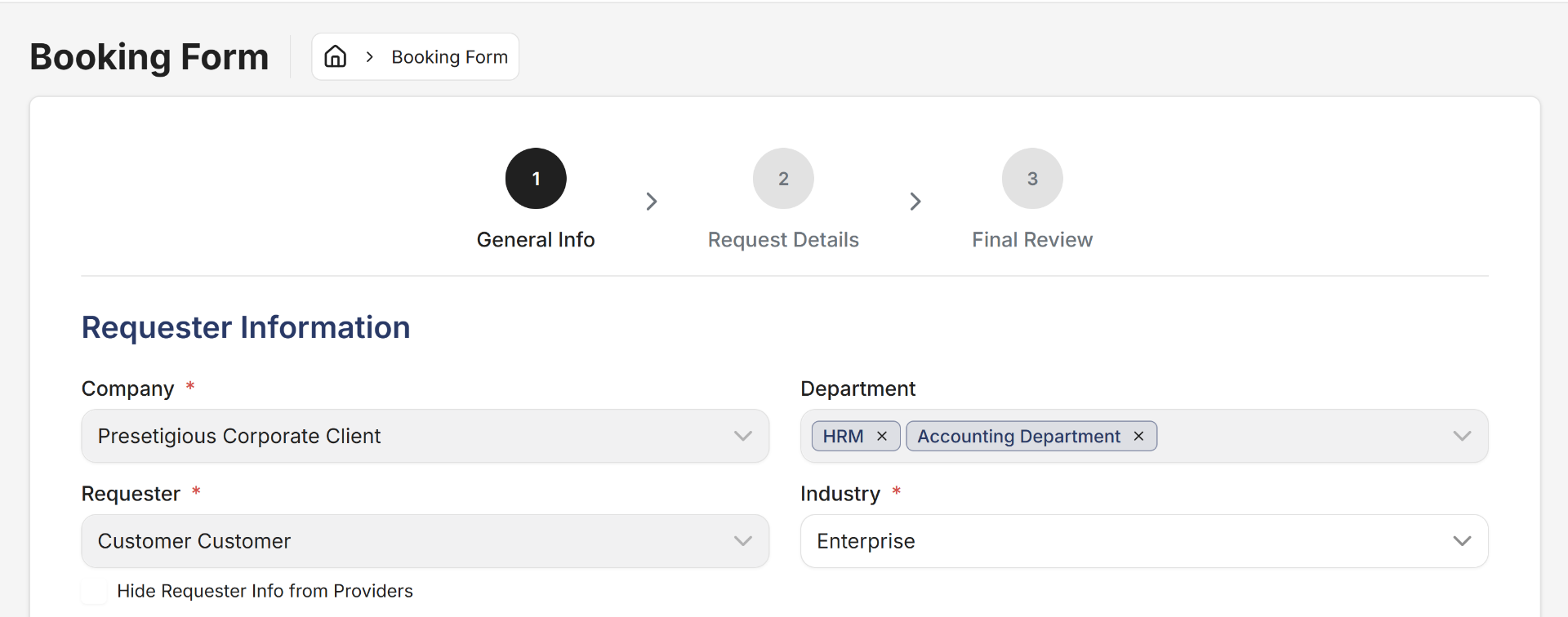
    Eclipse client booking form where customers submit new interpreting requests
    Client booking form — step-by-step request submission with company, department, and service details.

    Enterprise SLA benchmarks for professional-services platforms

    An SLA is the contractual floor on how reliable your platform has to be — and most agencies sign one without knowing what "good" looks like. When your schedulers, interpreters, and clients depend on the system to run the day, uptime and recovery commitments aren't fine print; they're the difference between a hiccup and a day of lost revenue. Use these enterprise professional-services SLA benchmarks to evaluate any vendor's written agreement, not just the brochure.

    SLA metricBasicStandard enterpriseWhat to demandWhy it matters
    Uptime99.5%99.9% (~8.8 hrs downtime/yr)99.9%+ with a public status pageSets the ceiling on acceptable outage
    Recovery Point Objective (RPO)24 hrs4 hrs≤ 1 hrHow much data you could lose in an incident
    Recovery Time Objective (RTO)24 hrs8 hrs≤ 4 hrsHow fast service is restored
    Critical (P1) acknowledgmentBest-effort1 hr≤ 15–30 minHow quickly someone owns the problem
    Resolution targetsNoneTiered by severityTiered, with service creditsTurns "we're on it" into a commitment
    Support coverageEmail onlyBusiness hours (e.g., 9–5 ET, M–F)Extended hours for critical issuesWhether help exists when you need it
    Encryption in transitTLS 1.2TLS 1.3TLS 1.3 + encryption at restProtects PHI and client data
    Backup retentionNot stated7 days≥ 72 hrs point-in-time + archivalYour ability to roll back
    Service creditsNonePartialDefined credit schedule on breachMakes the SLA enforceable

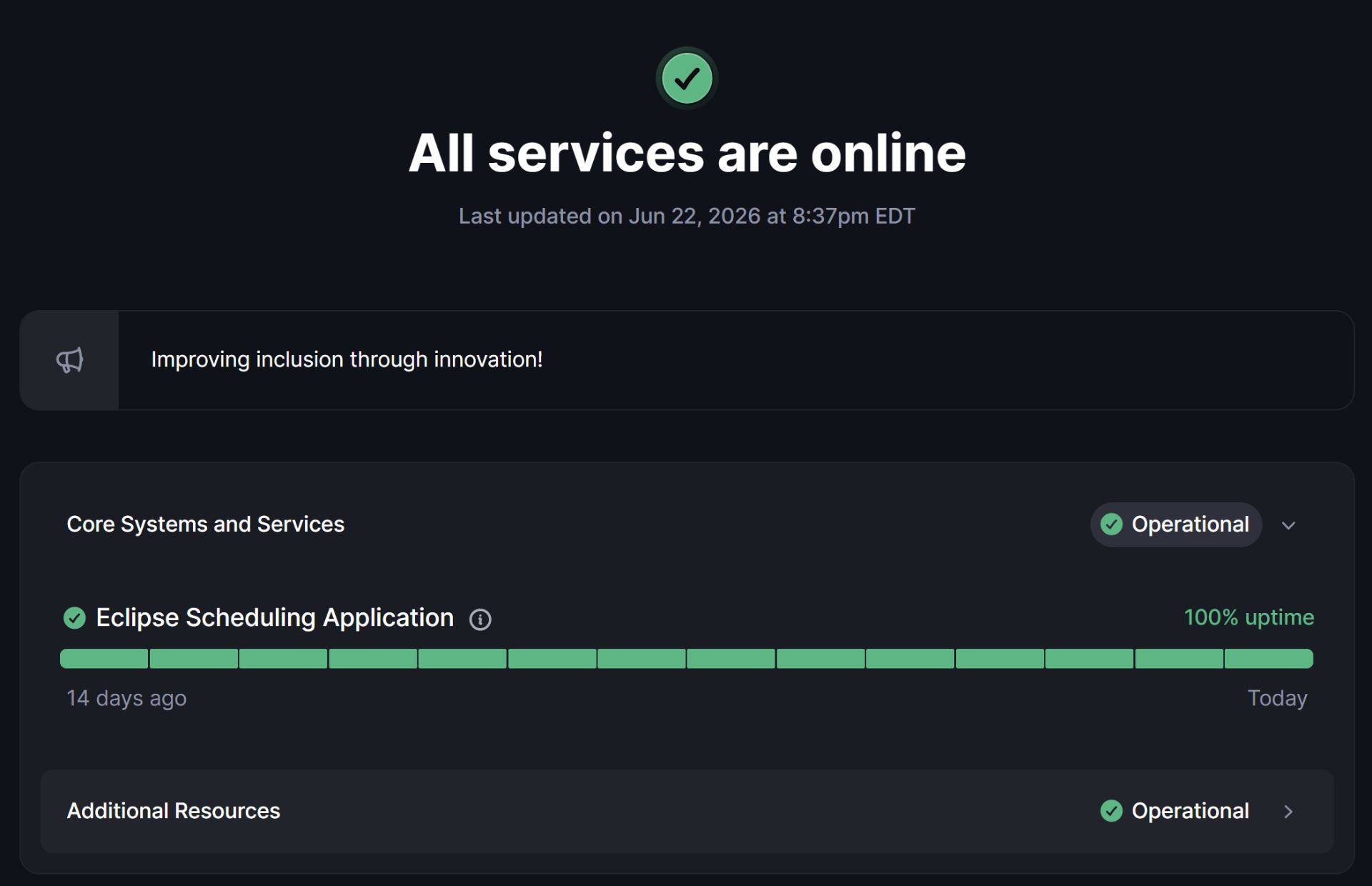
    These are general benchmarks for evaluating any vendor — always confirm the specifics in the vendor's written SLA, not a sales conversation. For reference, Eclipse runs on AWS in a multi-availability-zone configuration with a 99.9% uptime commitment, TLS 1.3 in transit, a one-hour RPO and four-hour RTO, tiered incident response, and a public status page, backed by SOC 2 Type II and HIPAA.

    Eclipse public status page showing all services online with 100% uptime
    Eclipse public status page — real-time uptime and incident history.

    What implementation actually looks like

    The fear that keeps agencies on spreadsheets is that switching will be worse than staying. In practice, a focused migration is far less painful than another year of manual coordination. Expect four steps: exporting and mapping your existing data, configuring your rate rules, billing, and service catalog to match how you work, training your schedulers and interpreters, and a go-live with support standing by. With Eclipse, that runs one to two weeks for most clients, and support continues for the life of your subscription rather than ending when onboarding does.

    What it will cost — and the questions that reveal the real price

    Interpreter scheduling platforms are usually priced by subscription, often with usage-based components for VRI and OPI minutes, and public rate sheets are rare in this market. That makes apples-to-apples comparison hard, so the useful move is to standardize the questions you ask every vendor: Is accounting integration included or an add-on? Are billing and payment modules extra? Is there an onboarding fee? How often do you ship new features? Is support included for the life of the subscription or only through onboarding? The answers, more than the headline number, tell you what you'll actually pay over a year. Eclipse publishes its tiers — Launch, Star, Constellation, and Galaxy — and the calculator above estimates your cost against them.

    Frequently asked questions

    What's the difference between interpreter scheduling software and a generic scheduling system?
    A generic system books time slots. Interpreter scheduling software matches each request to a qualified interpreter by language pair, certification, modality, location, and consumer preference, then carries the job through credentialing, billing, and provider pay tracking. The matching and compliance logic is the difference.
    Is interpreter scheduling software HIPAA compliant?
    It can be, but compliance is a property of the specific vendor, not the category. Look for documented HIPAA compliance and a SOC 2 Type II report, and confirm encryption and data-residency specifics in writing. Eclipse is HIPAA compliant and SOC 2 Type II.
    What uptime should I require in the SLA?
    For production scheduling that runs your day, ask for 99.9% or better, backed by a public status page and a defined recovery point and recovery time objective. Anything vaguer than a number is not a commitment.
    Can one platform handle VRI, OPI, and on-site in the same system?
    Yes — that's the point of a purpose-built platform. Eclipse handles on-site, VRI, OPI, translation, captioning, sign language, and accessibility services in one place, with VRI and OPI network coverage available at your discretion.
    Will the platform compete with my agency for clients?
    It depends on the business model. Network-model vendors operate their own interpreter pools and sell interpreting services, which can put them in your market. Eclipse is a management platform only and does not sell interpreting services against its LSP clients.
    How long does it take to get up and running?
    With Eclipse, most clients are trained and live in one to two weeks. Timelines elsewhere vary; ask for a specific commitment and what onboarding costs.
    Are integrations and billing modules extra?
    Often, yes — confirm it for every vendor. Eclipse includes QuickBooks integration and billing modules at no additional cost and charges no onboarding fee.
    How often does the platform get new features?
    Cadence varies widely. Eclipse ships enhancements and new features monthly.

    Choosing well

    The right interpreter scheduling platform disappears into your operation: schedulers fill assignments faster, interpreters get clear job details and reminders, clients see one consistent experience, and billing stops leaking. The wrong one becomes another system your team routes around. Evaluate adoption first, then configurability, compliance, service breadth, and what's actually included — and read the SLA before you read the brochure.

    See how Eclipse fits your agency.

    Book a walkthrough tailored to how your team already works.

    Take this guide with you

    Download the full buyer's guide as a PDF to share with your team.